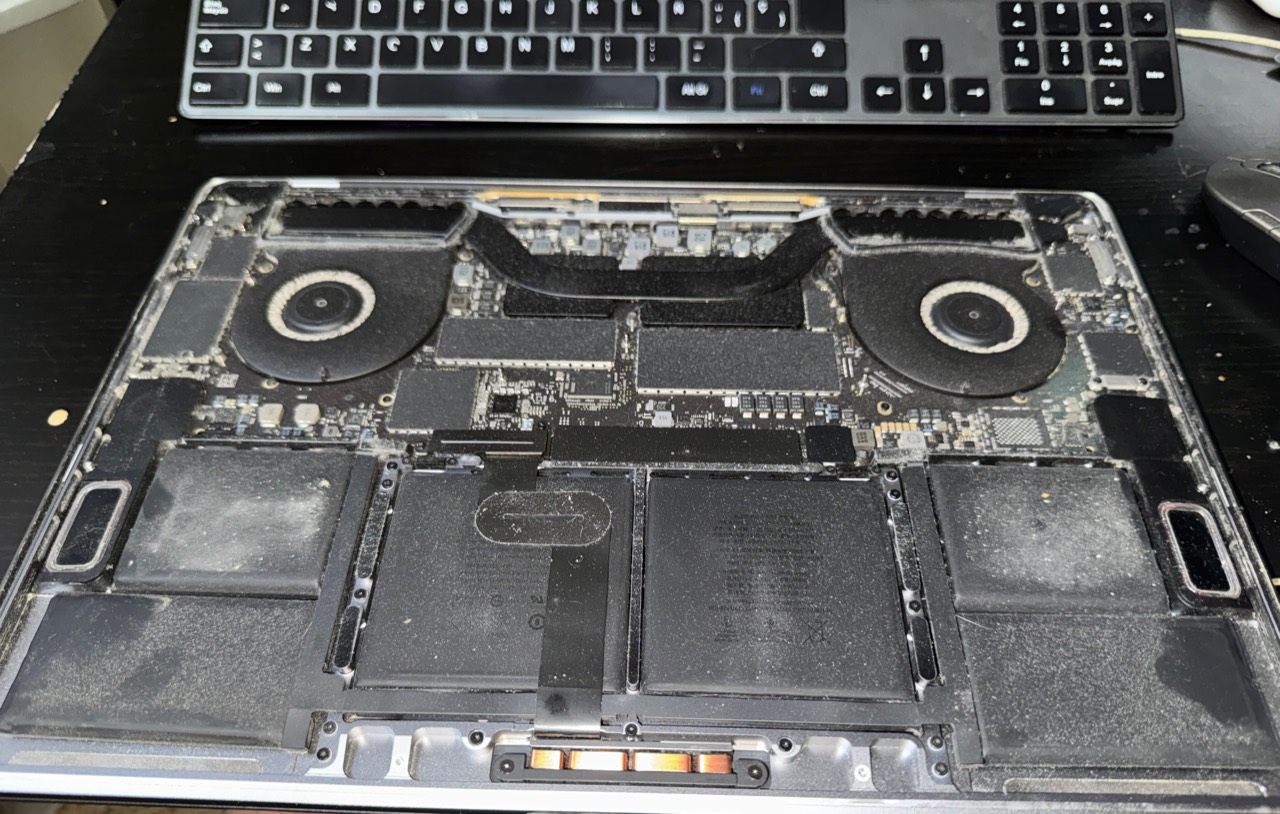
A computer can keep working for years while dust builds up in its filters, fans and heatsinks. That dirt is more than a cosmetic issue: it restricts airflow, increases temperature and makes fans work harder. The effects often appear gradually as noise, reduced performance or unexpected shutdowns.
Physical computer cleaning is not the same as deleting temporary files or running a software cleaner. Physical cleaning deals with the inside of the device and its cooling system; software maintenance deals with the operating system. A computer may need both, but they solve different problems.
Signs that a computer may need internal cleaning
- Fans are loud during simple tasks.
- The exhaust air or case feels hotter than it used to.
- Performance drops after several minutes of use.
- The device shuts down or restarts during demanding work.
- Dust is visible on vents or filters.
- The computer has not been opened or inspected for years.
None of these symptoms proves that dust is the cause. A worn fan, degraded thermal material, battery fault or electronic problem can look similar. Temperatures and behaviour should therefore be checked before and after any work.
What proper cleaning normally includes
- Powering down, disconnecting and visually inspecting the device.
- Opening it with the correct procedure for the model.
- Removing dust from fans, heatsinks, vents, filters and airflow paths.
- Holding fans still while cleaning so they do not spin uncontrollably.
- Checking visible cables, connectors and components.
- Reassembling and testing fan operation, noise, temperatures and stability.
Thermal paste does not need to be replaced automatically on every device. It is changed when access is safe and temperatures, age or its condition make the work worthwhile. Modern laptops can contain delicate batteries, ribbon cables and shields, and every model opens differently.
Why careless vacuuming or blowing can cause problems
A household vacuum can generate static electricity and its nozzle can strike components. Air used too close to the device may force dirt into connectors or spin a fan beyond its intended speed. It is also easy to dislodge a cable, memory module or connector.
How often should a desktop or laptop be cleaned?
There is no universal interval. A computer kept above the floor in a clean room may take a long time to collect dust. One under a desk, near pets, smoke, renovation work or textiles may need attention much sooner.
As a practical guide, inspect accessible vents and filters every few months. Internal cleaning may make sense roughly every one or two years, sooner if noise, heat or a dusty environment indicate a need. The actual condition matters more than a fixed date.
Physical cleaning is different from software cleaning
A slow computer may be affected by startup applications, low disk space, a mechanical hard drive, insufficient memory or operating system errors. Removing dust will not speed up a slow disk, just as deleting temporary files will not unblock a heatsink.
A useful assessment separates cooling and temperature from storage, memory, processes and the operating system. This avoids presenting cleaning as a universal cure.
When cleaning is appropriate and when diagnosis comes first
If a device works but is dirty, noisy or hot, preventive cleaning may stop the problem getting worse. If it already shuts down, will not power on, smells burnt or fails intermittently, stop repeated attempts and diagnose it first.
BCN PC Solutions provides internal computer cleaning and computer maintenance in Barcelona, Badalona, L'Hospitalet de Llobregat, Santa Coloma de Gramenet and Sant Adrià de Besòs.
Frequently asked questions
Will cleaning make my computer faster?
Only if excess heat was reducing performance. Storage, memory or operating system bottlenecks require a different solution.
Must thermal paste always be replaced?
No. It depends on the device, temperatures, age and access to the cooling system.
Will cleaning erase my data?
Normal physical cleaning does not alter stored data. Important computers should nevertheless have an independent backup.
Frequently asked questions
It can help if the problem is dirt or blocked ventilation. A worn fan or another fault may require a different action; we check before promising results.
It depends on dust, pets, location, and use. Increased noise or temperature justifies a check-up, without waiting for the equipment to shut down on its own.
 United States (+1)
 United Kingdom (+44)
 Spain (+34)
 France (+33)
 Germany (+49)
 India (+91)